

STalign aligns spatial transcriptomics (ST) tissue sections to each other and to 3D atlases like the Allen Brain Atlas using algorithms that build upon diffeomorphic metric mapping.
More information regarding the overall approach, methods and validations can be found in our publication: STalign: Alignment of spatial transcriptomics data using diffeomorphic metric mapping Kalen Clifton*, Manjari Anant*, Gohta Aihara, Lyla Atta, Osagie K Aimiuwu, Justus M Kebschull, Michael I Miller, Daniel Tward^, Jean Fan^
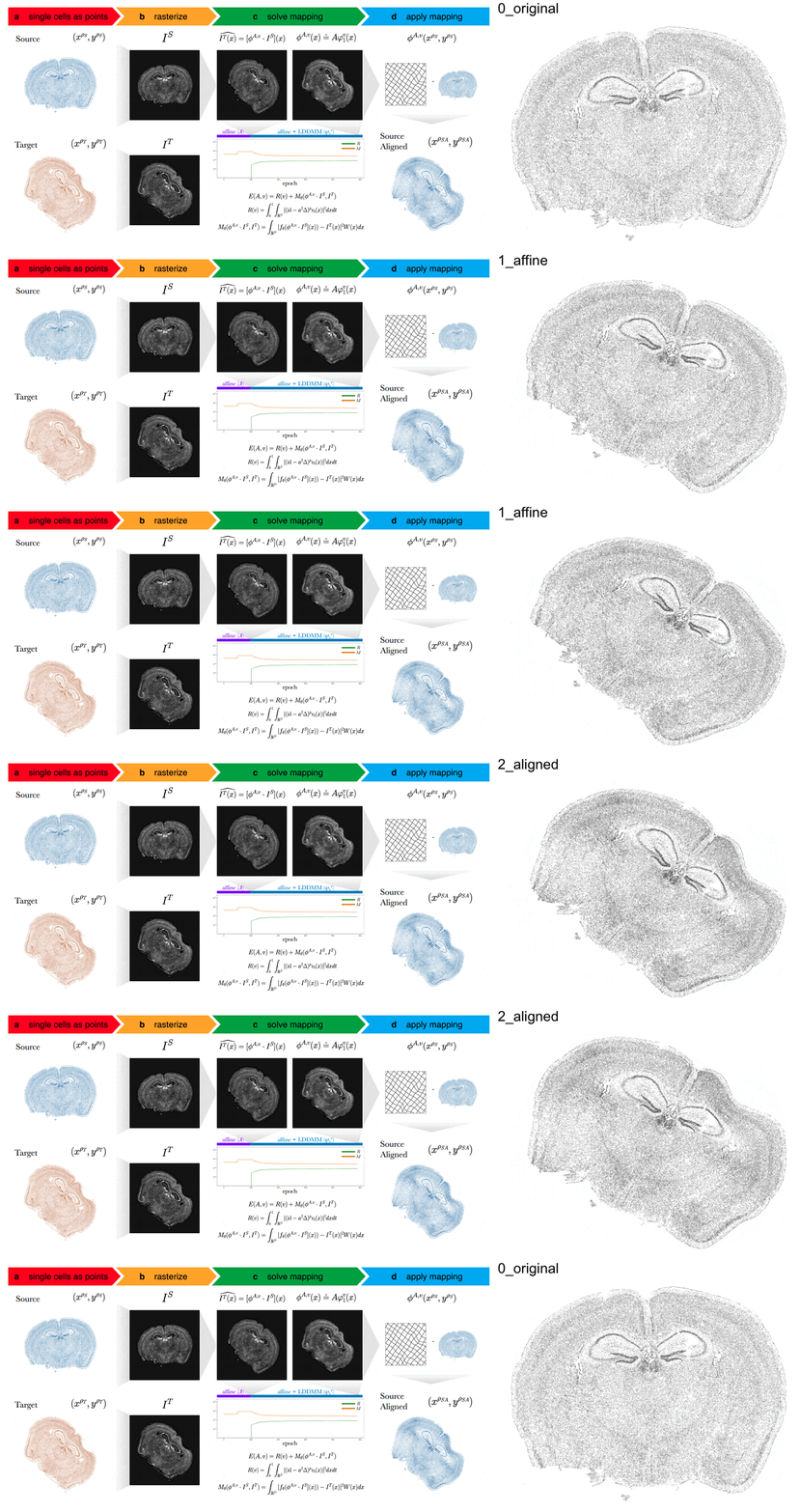

STalign enables:
- alignment of single-cell resolution ST datasets within technologies
- alignment single-cell resolution ST datasets to histology
- alignment of ST datasets across technologies
- alignment of ST datasets to a 3D common coordinate framework
pip install --upgrade "git+https://github.com/JEFworks-Lab/STalign.git"
This installs STalign and the dependencies listed in requirements.txt. The tutorials also use plotly, scipy, scikit-learn and scikit-image:
pip install plotly scipy scikit-learn scikit-image
To import STalign in Python:
from STalign import STalignIf a C++17 compiler is available, pip also compiles a C++ engine for LDDMM and LDDMM_3D_to_slice: the Xcode Command Line Tools on macOS (xcode-select --install), g++ or clang++ on Linux, or the Microsoft C++ Build Tools on Windows. The compiler is optional: without one the installation still succeeds and STalign uses its pure torch implementation, which computes the same iterations up to rounding, only more slowly (see Performance). The engine has been tested on macOS (Apple clang) and Linux (gcc 11 and 13); Windows builds are expected to work but have not been tested yet.
backend_info() tells which engine is used:
STalign.backend_info()
# {'auto': 'cpp', 'cpp': True, 'cpp_error': None, 'num_threads': 16}
'auto': 'cpp' means that alignments on the CPU in float64 (the default) use the C++ engine; otherwise 'cpp_error' says why it is not available (pip install -v also shows a warning in the build log). Alignments on a GPU or in float32 always use torch, and backend='cpp' or backend='torch' chooses explicitly. An alignment uses at most torch.get_num_threads() CPU threads; the environment variable STALIGN_NUM_THREADS or the argument num_threads sets another maximum. Results do not depend on the number of threads.
To use STalign from a clone of this repository without installing it (as the tutorials do with sys.path.append), build the engine once, from the base directory of the clone:
pip install pybind11 setuptools
python setup.py build_ext --inplace
To work in a pipenv environment, fork and git clone this repository. From its base directory, create a Pipfile.lock from the Pipfile and activate the environment (exit leaves it):
pipenv install requests
pipenv shell
Pipfile.lock depends on the platform: do not commit it if you contribute to STalign or share the repository with others.
Version 2.0.0 keeps the functions and arguments of earlier versions, aligns much faster, fixes several bugs and chooses more of the alignment settings from the data, so alignments differ from earlier results. For example, the 10,000 iterations of the MERFISH tutorial take about 10 s with the C++ engine and 1.5 min with torch, instead of about 9 min. The changes most likely to matter for existing scripts:
LDDMMandLDDMM_3D_to_slicestart with a coarse affine pre-alignment that finds large rotations (2D) and tilted slice planes (3D), and choosesigmaRand, in 2D, the step sizes from the images (coordinates in µm);LDDMMruns 2000 iterations by default. Arguments you pass are used as given;prefit=Falseturns the pre-alignment off, andlegacy_defaults=Trueall of these defaults (it keeps the corrections below). On held-out synthetic test problems, the geometric mean alignment error with the new defaults was 0.43 times that withlegacy_defaults=Truein 2D and 0.21 times in 3D.transform_points_source_to_targetand the other source-to-target transforms use the exact inverse of the fitted map; cells can move by up to about 100 µm on the tutorial datasets (exact_inverse=Falsegives the previous approximation). With landmarks,LDDMMmatches them under this map.- The regularizer of
LDDMM_3D_to_sliceis corrected and the step of each affine parameter is controlled, so 3D alignments change and no longer depend on rounding.analyze3Dalignreturns corrected atlas coordinates. LDDMMandLDDMM_3D_to_slicedraw their figures once, at the end (draw=Trueredraws them every 10 iterations as before,draw=Falseturns them off).- New:
align_cellsaligns two sets of cells in one call (see Input Data),rasterize(..., blur_um=...)gives the kernel width in µm, andLDDMM(mixture='em')can help where the target section lacks tissue that the source has.
CHANGES.md lists every change with its measured effect.
Time of the tutorials' alignments (LDDMM or LDDMM_3D_to_slice) with their own data, parameters and numbers of iterations, on a Mac / on Linux (end to end adds rasterizing the cells and transforming them):
| tutorial | iterations | version 1.0 | C++ engine | torch engine |
|---|---|---|---|---|
| MERFISH to MERFISH | 10,000 | 9.2 min / 12.1 min | 10 s / 45 s | 1.5 min / 1.7 min |
| MERFISH, simulated deformation | 1,000 | 2.3 min / 3.8 min | 4.2 s / 14 s | 19 s / 31 s |
| Xenium to Xenium | 300 | 10 s / 15 s | 0.18 s / 0.65 s | 1.8 s / 2.3 s |
| Xenium to H&E image | 2,000 | 1.3 min / 1.9 min | 1.5 s / 6.5 s | 14 s / 24 s |
| Heart sections | 1,000 | 2.9 min / 3.8 min | 7.2 s / 31 s | 29 s / 1.1 min |
| MERFISH to Visium, with landmarks | 200 | 4.2 min / 12.5 min | 4.4 s / 30 s | 35 s / 2.0 min |
| MERFISH to Allen atlas (3D) | 2,000 | 21.6 min / 48.4 min | 34 s / 3.0 min | 1.8 min / 8.1 min |
| STARmap to Allen atlas (3D) | 800 | 16.3 min / 32.8 min | 30 s / 2.8 min | 2.0 min / 7.6 min |
| Visium to Visium, affine only | 1,000 | 16 s / 30 s | 0.92 s / 1.1 s | 1.3 s / 1.9 s |
| Xenium to STARmap | 4,000 | 2.4 min / 3.3 min | 6.2 s / 14 s | 25 s / 31 s |
| all 10 tutorials | 60.6 min / 119.3 min | 1.6 min / 8.2 min | 7.5 min / 22.0 min | |
| all 10, end to end | 61.1 min / 120.2 min | 1.7 min / 8.2 min | 7.5 min / 22.1 min |
Measured on an Apple M1 Ultra (macOS, 16 threads) and an AMD Ryzen 5 5560U (Linux, 8 threads), one alignment at a time, on the CPU in float64 without figures; version 1.0 ran with 2 threads or with 16 (Linux: 8), whichever was faster, for 100–300 iterations (all of them for Xenium to Xenium and Visium to Visium), extrapolated to the tutorial's number from its steady time per iteration. Of these times, the new affine pre-fit and step sizes take up to 6 s on the Mac (12 s on Linux); legacy_defaults=True skips them. Rasterizing 86,000 cells takes 31 ms instead of 1.8 s, and transforming all cells of a tutorial takes at most 0.07 s (Mac). The method and more numbers are in CHANGES.md.
To use this tool, you will need provide the following information:
- Source: Arrays of x and y positions of cells
- Target: Arrays of x and y positions of cells
STalign.align_cells(xI, yI, xJ, yJ) aligns two such sets of cells in one call: it rasterizes them at 15 µm and runs LDDMM coarse to fine, which had 0.39 times the error of LDDMM on the 15, 30 or 60 µm rasters of our tests (but 5–14% more error on 9 of the 11 problems whose rasters had 15 µm pixels; see CHANGES.md). By default it uses LDDMM's mixture model (mixture='em'), which helps where the target lacks tissue that the source has but made targets of uneven cell density worse in our tests; mixture=None turns it off. Its result works with the transform functions like that of LDDMM.
- Source: Arrays of x and y positions of cells from single-cell resolution ST data
- Target: Registered H&E image from spot-resolution ST data
- Source: (Default: Adult mouse Allen Brain Altas CCFv3) 3D Matrix with voxels corresponding to (1) cell intensity and (2) annotated tissue regions
- Target: Arrays of x and y positions of cells
To use STalign, please refer to our tutorials with usage examples.