Repository navigation
Accessibility Issue - Inappropriate use of aria-pressed attribute #4469

Description

Issue Description : -
Interactive elements need a programmatically determined name, role, and value. These properties must also be accurate and appropriate.
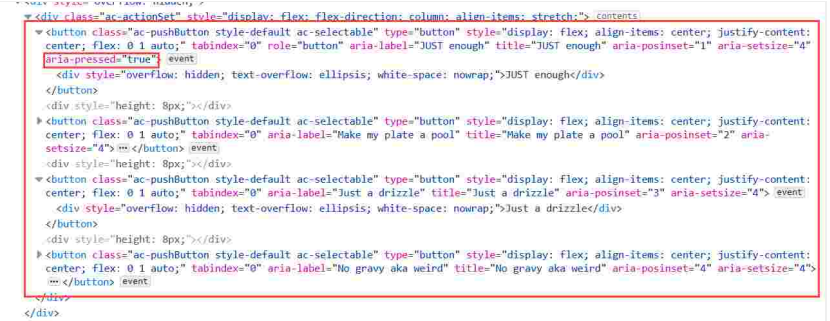
There are button elements where state have been used unnecessarily. This may particularly disadvantage users that interface with the accessibility properties of elements, such as screen reader and voice recognition users.
Success Criteria : -
Remove aria-pressed attribute from the source code of the buttons. For example:
JUST enough
For more information, see WAI-ARIA Practices - Toggle Button. As well, for guidance on reviewing accessibility properties, see Chrome - Accessibility properties, Edge - Accessibility Pane, and Firefox - Accessibility Inspector.
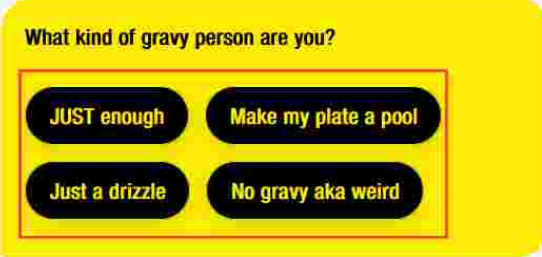
Steps to reproduce
- Observe the interactive elements.
- Inspect the elements and review the DOM.
- Review the computed accessibility properties.
- Observe that the aria-pressed is incorrectly used.
Webchat Version :- 4.13.0
Activity
compulim commentedon Oct 28, 2022
The buttons in the Adaptive Card are for making decisions. When the "JUST enough" button is clicked, a decision is being made and it will be highlighted.
When the end-user move the cursor and read the message again. The
aria-pressed="true"will help them to identify which decision they had made, or in other words, which button they had clicked.This is a screenshot from our sample:
When the button is being clicked, the button will be highlighted (in blue).
We have some early accessibility reports saying the decision (i.e. button) cannot properly identified after the button is clicked. Thus, we added
aria-pressedto make them a toggle button.I read a few WAI-ARIA articles but I could not find anything that would say the current usage is not great. There are things that I read along with excerpts:
aria-pressedstateWhile I understand the button is not exactly toggleable: once it's pushed, it's pushed and cannot be popped. The
aria-pressedseems still valid to use.Could you:
aria-pressed, could you tell us if there are better alternatives that we could use to indicate a decision?compulim commentedon Jan 10, 2023
Pending for suggestions on: "what ARIA role/attributes to use for one-off decision making buttons".
OEvgeny commentedon Oct 21, 2026
Thanks for the report.
Card action buttons had
aria-pressed, so that the choice a user made stayed available to screen readers. However, screen readers announce such buttons as toggle buttons ("toggle button, not pressed"), although these buttons never toggle back. #5900 makes them plain buttons:aria-describedby) and gets theadaptive-card-renderer__action--selectedclass instead ofaria-pressed="true".The role is now button, and the choice is still exposed, through the description (WCAG 4.1.2). Hosts with CSS for
.ac-pushButton[aria-pressed='true']should target.ac-pushButton.adaptive-card-renderer__action--selectedinstead. Both changes are onmainand will ship in the next release.We are closing this issue as fixed by #5900 and #5928. Please reopen if a card action is still announced as a toggle button on a build that includes them.