Repository navigation
bug: Runtime packaged application fails with misleading module 'flet' has no attribute 'ElevatedButton' error #6894

Description

Duplicate Check
- I have searched the opened issues and there are no duplicates
Describe the bug
ENVIRONMENT
Windows 11
Python 3.13.14
Flet 0.86.3 (reproduced)
Flet 1.0.1 (reproduced)
Flutter 3.44.8
BUILD COMMAND
flet build windows -v
SUMMARY
A Flet application that uses:
ft.ElevatedButton(...)
...builds successfully, but the generated Windows executable fails at runtime with:
AttributeError: module 'flet' has no attribute 'ElevatedButton'
However, ElevatedButton clearly exists and can be imported and instantiated successfully from Python.
Replacing:
ft.ElevatedButton(...)
...with:
ft.Button(...)
...allows the executable to launch normally.
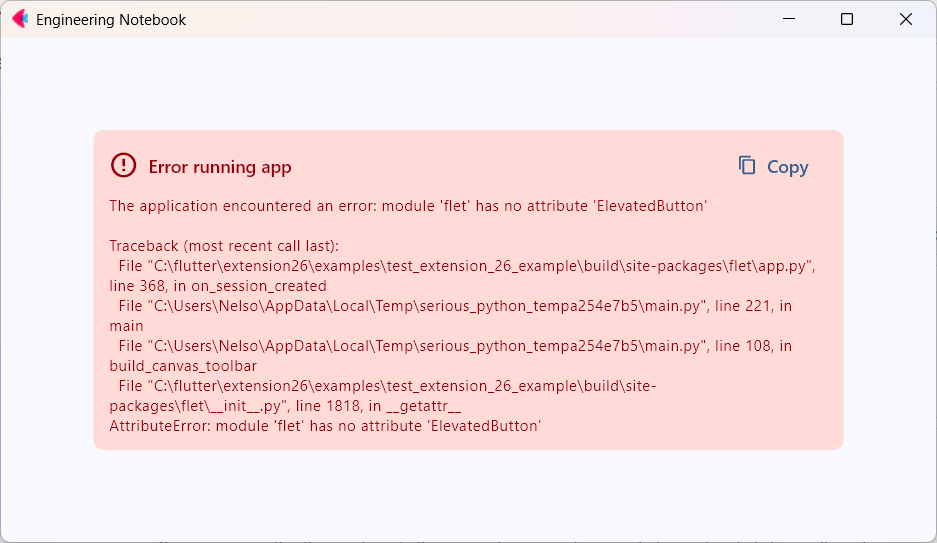
RUNTIME ERROR
The application encountered an error:
module 'flet' has no attribute 'ElevatedButton'

Traceback (most recent call last):
  File "C:\flutter\extension26\examples\test_extension_26_example\build\site-packages\flet\app.py", line 368, in on_session_created
  File "C:\Users\Nelso\AppData\Local\Temp\serious_python_tempXXXX\main.py", line 221, in main
  File "C:\Users\Nelso\AppData\Local\Temp\serious_python_tempXXXX\main.py", line 108, in build_canvas_toolbar
  File "C:\flutter\extension26\examples\test_extension_26_example\build\site-packages\flet\__init__.py", line 1818, in __getattr__
AttributeError: module 'flet' has no attribute 'ElevatedButton'
VERIFICATION PERFORMED
Verified that ElevatedButton exists:
import flet as ft

print(ft.ElevatedButton)
...results in:
<class 'flet.controls.material.elevated_button.ElevatedButton'>
Verified that it can be instantiated:
import flet as ft

b = ft.ElevatedButton("Test")

print(b)
...results in:
DeprecationWarning:
ElevatedButton is deprecated since version 0.80.0 and will be removed in version 1.0.
Use Button instead.
Button(...)
This demonstrates:
- ElevatedButton exists.
- ElevatedButton imports successfully.
- ElevatedButton can be instantiated successfully.
- The symbol is not actually missing.
WORKAROUND
Replace:
ft.ElevatedButton(...)
...with:
ft.Button(...)
The executable then launches normally.
Code sample
Code
import flet as ft

def main(page: ft.Page):
    page.add(
        ft.ElevatedButton(
            "Test"
        )
    )

ft.app(main)
To reproduce
flet build windows
Expected behavior
EXPECTED BEHAVIOR
Either:
ft.ElevatedButton(...)
...should continue working while the API exists, or the runtime should produce an explicit deprecation/removal message such as:
ElevatedButton is deprecated.
Use ft.Button instead.
ACTUAL BEHAVIOR
A runtime error is generated:
module 'flet' has no attribute 'ElevatedButton'
...even though:
print(ft.ElevatedButton)
...and:
ft.ElevatedButton("Test")
...succeed in Python.
Screenshots / Videos
Captures
Operating System
Windows
Operating system details
Windows 11 Professional
Flet version
1.0.1 and 0.86.3
Regression
No, it isn't
Suggestions
WHY THIS IS PROBLEMATIC
The error message suggests:
- Broken installation
- Incorrect Flet version
- Missing package
- Packaging failure
As a result, significant debugging effort was spent investigating:
- Flutter assets
- pubspec.yaml changes
- build artifacts
- Flet packaging
- version mismatches
...when the actual workaround was simply changing:
ft.ElevatedButton
...to:
ft.Button
ADDITIONAL NOTES
-
Reproduced on Flet 0.86.3.
-
Reproduced again after upgrading to:
Flet 1.0.1
flet-cli 1.0.1
flet-desktop 1.0.1
flet-web 1.0.1 -
Build completes successfully.
-
Failure occurs only after launching the generated executable.
Logs
Logs
Traceback (most recent call last):
  File "C:\flutter\extension26\examples\test_extension_26_example\build\site-packages\flet\app.py", line 368, in on_session_created
  File "C:\Users\Nelso\AppData\Local\Temp\serious_python_tempa254e7b5\main.py", line 221, in main
  File "C:\Users\Nelso\AppData\Local\Temp\serious_python_tempa254e7b5\main.py", line 108, in build_canvas_toolbar
  File "C:\flutter\extension26\examples\test_extension_26_example\build\site-packages\flet\__init__.py", line 1818, in __getattr__
AttributeError: module 'flet' has no attribute 'ElevatedButton'
Additional details
While investigating this issue, a significant amount of debugging time was spent distinguishing between:
- Runtime packaging issues
- Flutter extension issues
- Stale generated artifacts
- Actual application code defects
For developers working with custom Flet extensions, it is often unclear when a Flutter dependency change requires a full rebuild of generated artifacts.
SUGGESTED IMPROVEMENTS
- Better Detection of Stale Extension Artifacts
When files such as:
pubspec.yaml
...or Flutter extension source files change, it would be helpful if Flet could:
- Detect the change automatically.
- Warn that cached/generated artifacts may be stale.
- Recommend the appropriate cleanup steps.
Example:
Detected changes to Flutter extension dependencies.

A clean rebuild is recommended:

    flutter clean
    flutter pub get
    flet clean
- Add an Official "Deep Clean" Command
Historically, troubleshooting extension issues often involves manually removing build directories.
For example:
build/
.dart_tool/
.flutter-plugins-dependencies
A command such as:
flet clean --deep
...could remove all generated artifacts associated with:
- Flutter
- Python packaging
- Extension packaging
This would eliminate guesswork and make troubleshooting much easier.
- Improved Error Reporting for Packaged Applications
In this case, the runtime error ultimately pointed to:
module 'flet' has no attribute 'ElevatedButton'
However, the actual resolution was replacing a deprecated control with:
ft.Button(...)
The error message caused debugging effort to focus on:
- Flutter assets
- pubspec.yaml
- Build cache corruption
- Version mismatches
...rather than the deprecated control itself.
More explicit diagnostics would substantially reduce troubleshooting time.
WHY THIS MATTERS
Flet's extension architecture combines:
- Python
- Flutter
- Dependency packaging
- Runtime code generation
When something goes wrong, developers can spend considerable time determining which layer is responsible.
Better cache management, rebuild guidance, and error diagnostics would greatly improve the extension-development experience.
Activity
ndonkoHenri commentedon Sep 27, 2026
Thanks for the detailed report. The error is accurate: the built app contains Flet 1.0.1, which removed
ElevatedButton(deprecated since 0.80.0). Line 1818 offlet/__init__.pyin your traceback only exists in 1.0.x. Yourprint(ft.ElevatedButton)check ran against 0.86, where the "will be removed in version 1.0" warning comes from.The build got 1.0.1 because your
pyproject.tomldeclaresflet>=0.86.x(the template default), andflet buildinstalled the newestfletthat allows, not the version in your lock file. From the next release,flet build,flet debugandflet publishpinfletand the official extensions to the CLI's own version. A requirement that rules that version out fails with an explanation, and removed names such asElevatedButtonpoint to their replacement.For now, either migrate (
ft.ElevatedButton→ft.Button,ft.app→ft.run), or stay on 0.86 by pinningflet(and any Flet extensions) to yourflet-cliversion, e.g.flet==0.86.3. On the cache suggestions: stale artifacts weren't involved here, andflet cleanalready removes the wholebuild/directory.nelson-python commentedon Sep 28, 2026
Hello @ndonkoHenri,
Thank you for the clarification.
I now understand that the packaged application installed Flet 1.0.1 because the build process used flet>=0.86.3.
However, when the issue was first encountered, my local development environment and installed Flet packages were all 0.86.3. The upgrade to 1.0.1 was performed later during troubleshooting after I had already spent a significant amount of time debugging the issue.
Could you clarify where the flet>=0.86.3 requirement originated from during packaging?
The reason I'm asking is that, from a developer's perspective, there was no indication that the packaged application would resolve and install a newer major version of Flet than the version installed locally and being used during development.
In particular, I'm trying to better understand:
Note: You may close this issue as "open in error". Apologies on my end.
Regards,
Nelson
ndonkoHenri commentedon Oct 11, 2026
Hi @nelson-python, no need to apologize. The report was useful and the questions are fair.
flet>=0.86.3came from: the project template.flet createwrites"flet>=<flet-cli version>"into[project].dependenciesinpyproject.toml, and the extension template's example app does the same. Yourexamples/test_extension_26_exampleis that example app.flet builddoes with it: it reads[project].dependencies(plus[tool.flet.<platform>].dependencies) and uses pip to install them into a freshsite-packagesfor the target platform. It doesn't look at your local environment oruv.lock. Soflet>=0.86.3resolved to the newestfleton PyPI, 1.0.1, even though everything installed locally was 0.86.3.A correction to my earlier reply: this change didn't make it into 1.0.2 or 1.0.3. In an upcoming release,
flet build,flet debugandflet publishwill installfletand the official extensions at the CLI's own version. If a requirement rules that version out, the command will stop and explain why. Accessing a name removed in 1.0, such asft.ElevatedButton, will tell you its replacement.Until then:
flet==0.86.3, and any Flet extensions to the same version, inpyproject.toml.ft.Buttonandft.run.Closing as you suggested. The build change will show up here when its PR is opened.