In-app network request logger and response mocker for React Native built for QA and debug builds.





Tap the floating button inside your app to inspect every outgoing axios request URL, method, headers, request body, response body, status code, and duration all without leaving your device or opening a desktop DevTools window. Mock any endpoint at runtime, switch between response variants on the fly, and test your UI under edge-case conditions without changing a single line of server code.
|
Inspect every axios request in real time URL, method, status, headers, request & response bodies, and duration. Filter by method or search by URL. 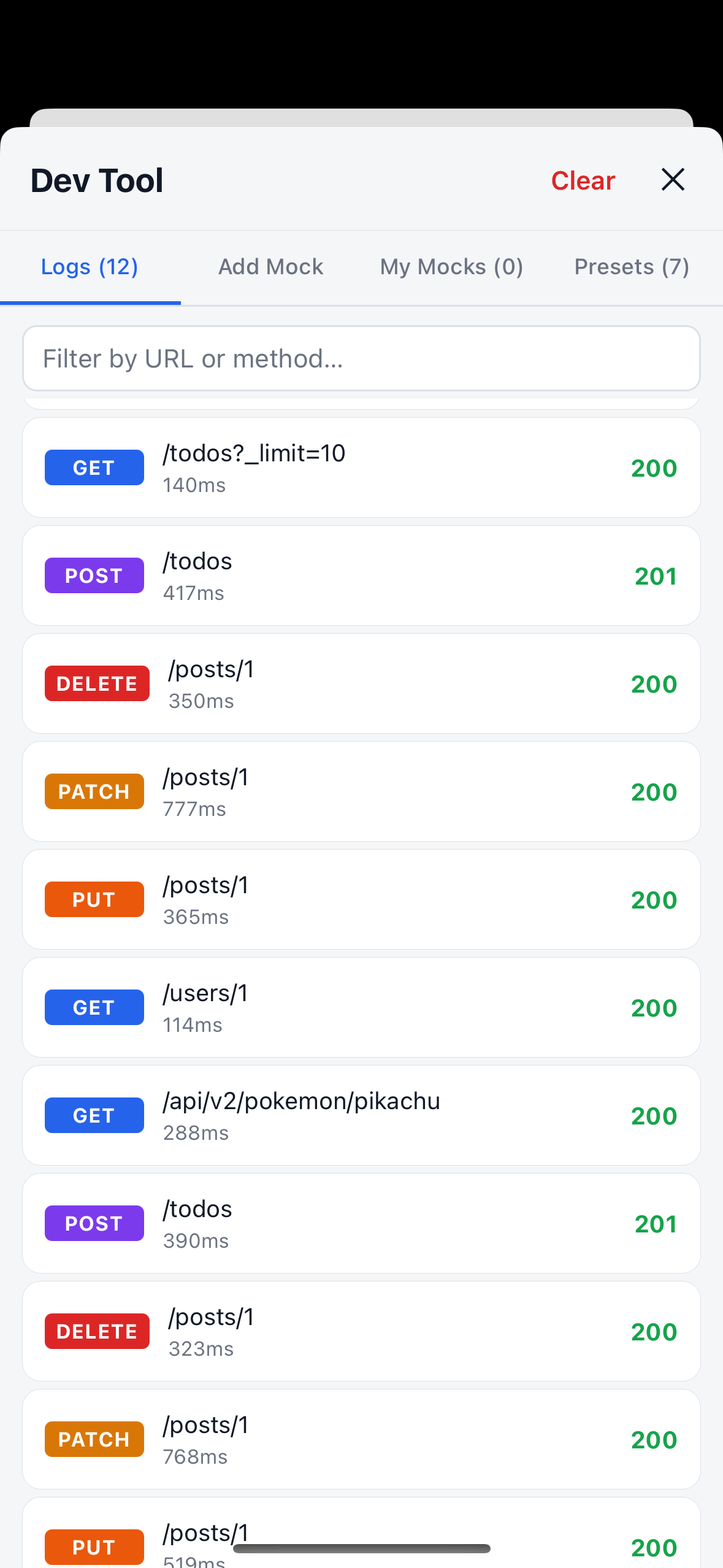
|
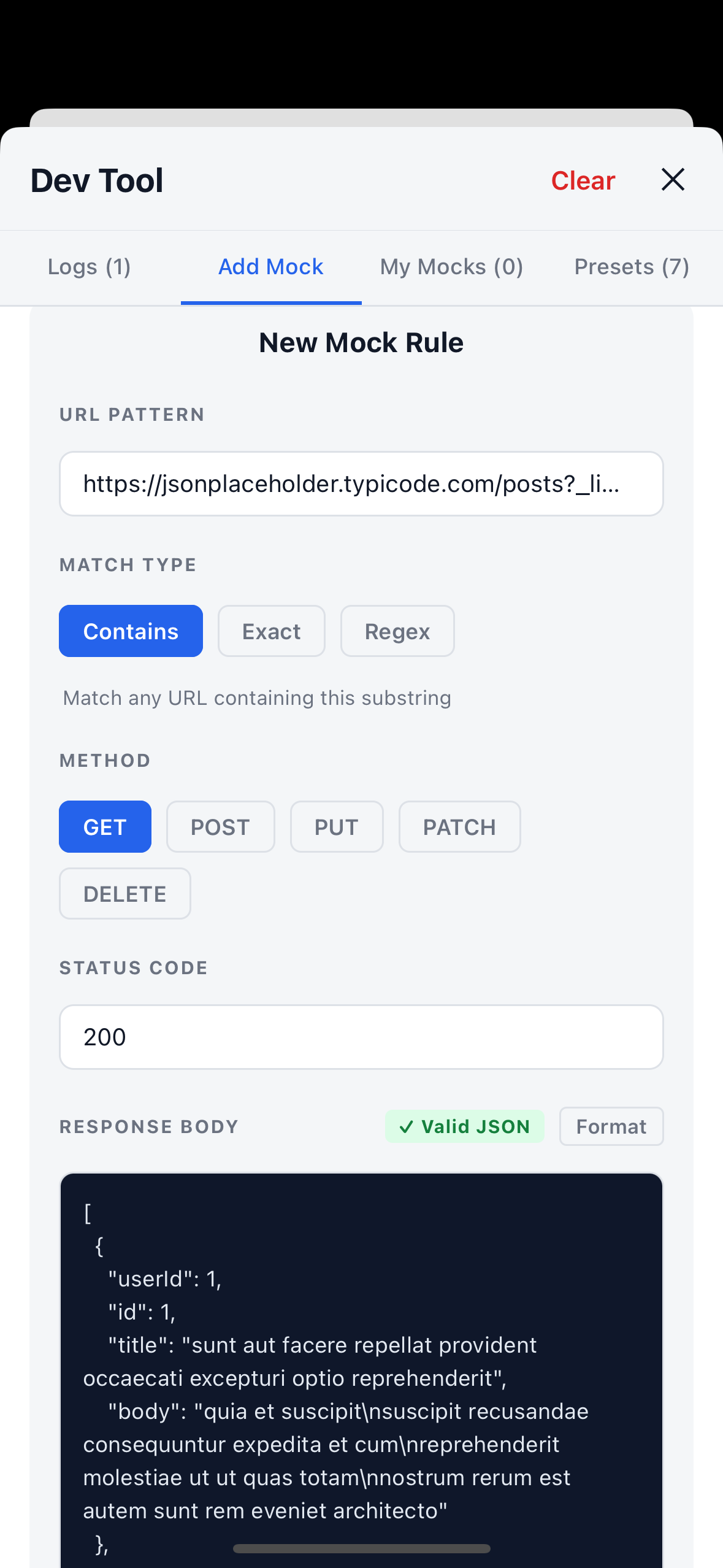
Tap Mock on any live log row to instantly pre-fill the mock editor with its URL, method, and response no copy pasting required. 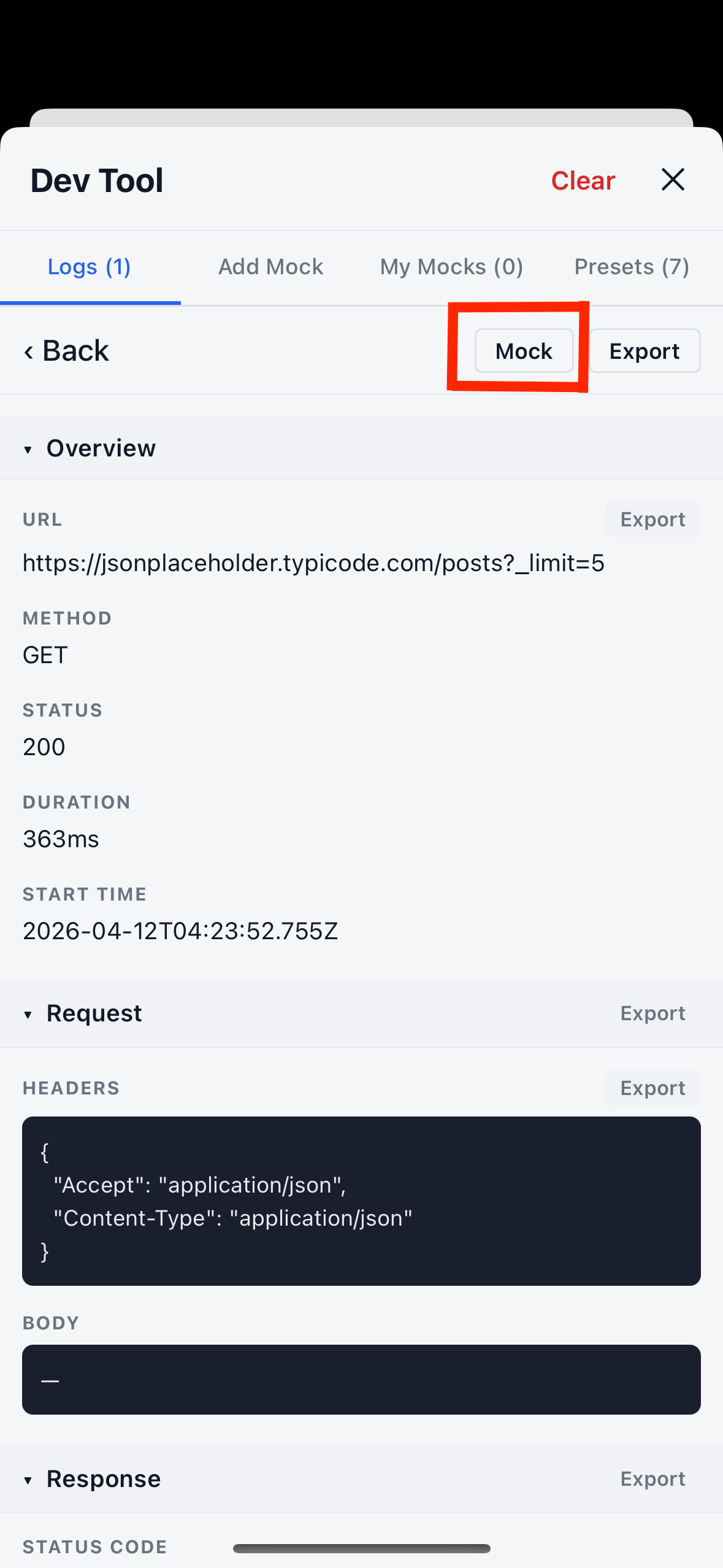
|
|
Manually create a mock rule for any endpoint. Choose URL match type ( 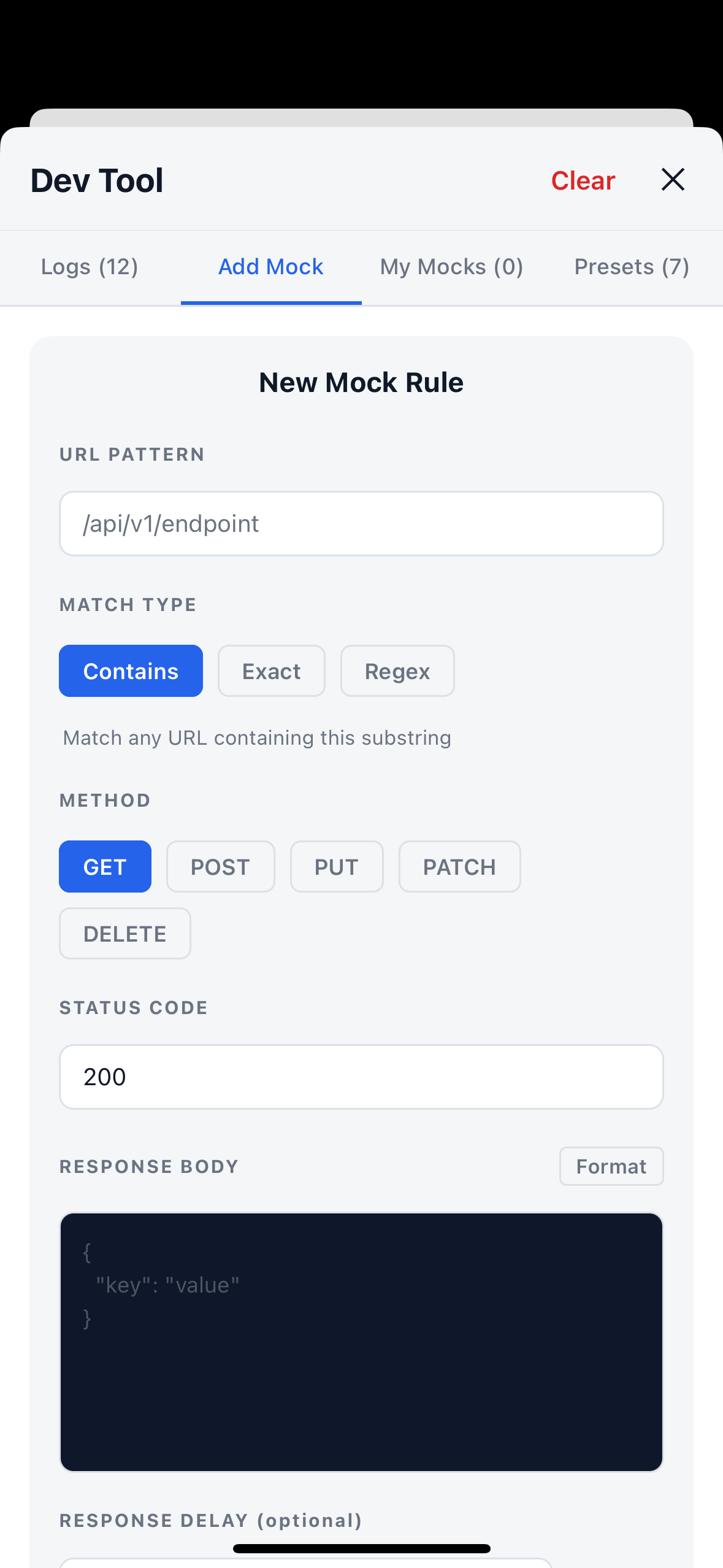
|
Pre-load mock rules at startup via 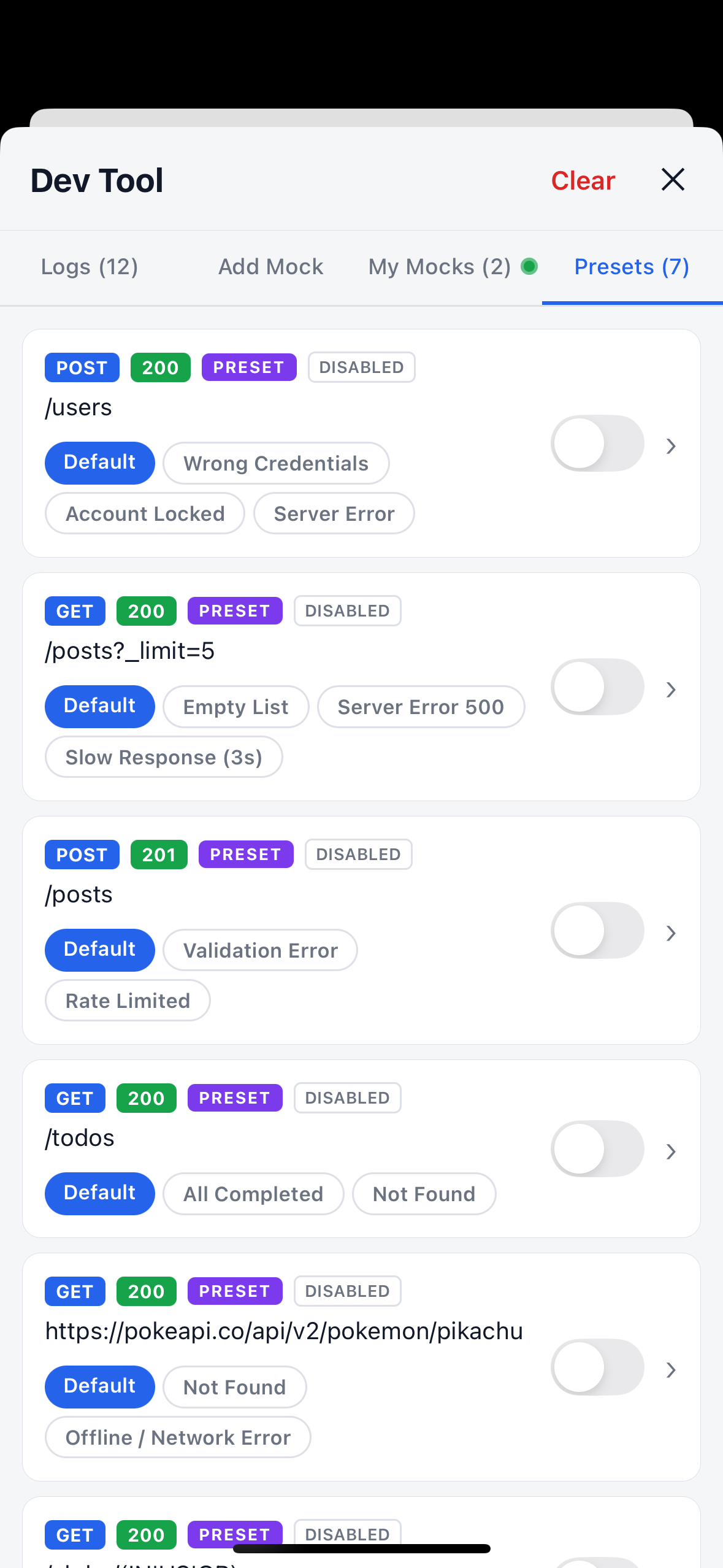
|
- Features
- Demo
- Installation
- Quick Start
- Usage Examples
- URL Match Types
- Configuration
- API Reference
- Contributing
- License
| One-component setup | A single <NetworkLogger> wrapper replaces all manual wiring. |
| Live request inspector | View URL, method, headers, request body, response body, status, and duration for every request. |
| Search & filter | Filter logs by URL or HTTP method in real time. |
| Export logs | Share any request/response as formatted JSON via the native share sheet on every field, section header, and from the detail screen header. |
| Response mocking | Force any endpoint to return a custom response without touching the server. |
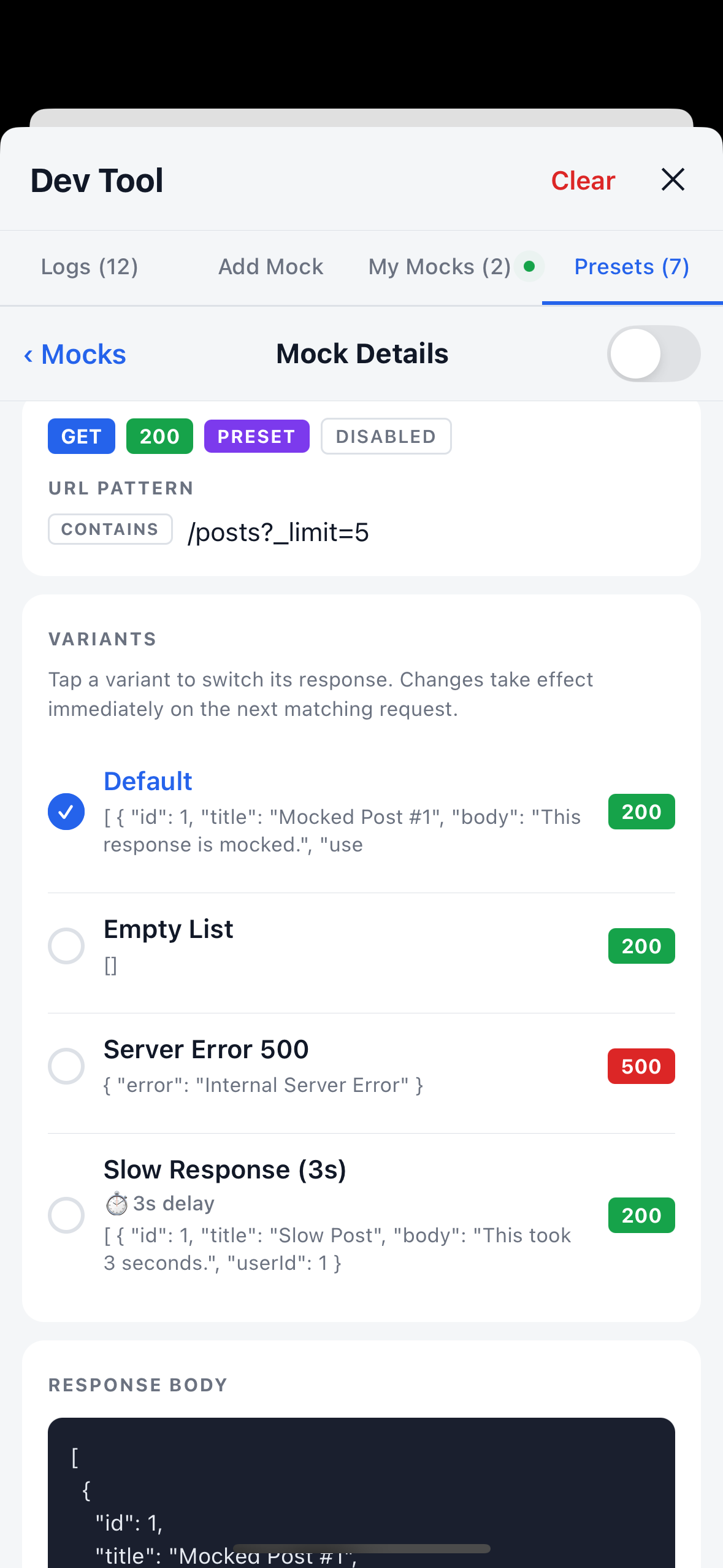
| Mock variants | Each rule carries multiple response scenarios; QA switches between them instantly at runtime without restarting the app. |
| Developer preset mocks | Pass initialMocks to pre-load rules at startup they appear with a PRESET badge in the panel. |
| Smart match priority | exact beats regex beats contains; longer patterns beat shorter within the same type; user mocks always beat presets. |
| Correct 4xx/5xx behaviour | Mocked error responses throw an AxiosError with error.response populated, so your catch blocks fire exactly as they would with a real server. |
| One-tap mock prefill | Tap any log row → Mock to pre-fill the editor instantly. |
| 4-tab panel | Logs / Add Mock / My Mocks / Presets. The My Mocks and Presets tabs each show a green ping dot when at least one mock in that category is currently enabled a quick in-panel signal that requests are being intercepted. |
| Mock active indicator | A green dot appears on the FAB corner whenever one or more mocks are enabled, so you can see interception is active without opening the panel at all. |
| Draggable FAB | Drag the floating button to any corner of the screen at runtime. |
| Dark mode | Follows the device color scheme automatically. |
| Multiple axios instances | Intercept as many clients as you need. |
| Zero production overhead | Pass enabled={__DEV__} to strip everything in release builds. |
| Zero non-peer dependencies | Only react, react-native, and axios. |
| Fully typed | Complete TypeScript definitions bundled no @types/ package needed. |
# npm
npm install react-native-network-inspector-devtools

# yarn
yarn add react-native-network-inspector-devtools

# pnpm
pnpm add react-native-network-inspector-devtoolsWrap your app root with <NetworkLogger> and you are done. A floating 🌐 button appears in dev builds.
// App.tsx
import React from "react";
import { NetworkLogger } from "react-native-network-inspector-devtools";

import { apiClient } from "./src/api"; // your axios instance
import { RootNavigator } from "./src/navigation";

export default function App() {
  return (
    <NetworkLogger enabled={__DEV__} instance={apiClient}>
      <RootNavigator />
    </NetworkLogger>
  );
}
That is the entire setup. Tap the floating button → inspect any request → tap Mock on a row to intercept it → toggle it on.
Intercept every client your app uses by passing an array. instance and instances can be combined.
import { NetworkLogger } from "react-native-network-inspector-devtools";
import { apiClient, legacyClient, uploadClient } from "./src/api";

export default function App() {
  return (
    <NetworkLogger
      enabled={__DEV__}
      instances={[apiClient, legacyClient, uploadClient]}
    >
      <RootNavigator />
    </NetworkLogger>
  );
}Seed the Presets tab with predefined responses at startup no UI interaction needed. The mocks are ready the moment the app opens.
import { NetworkLogger } from "react-native-network-inspector-devtools";
import type { MockPreset } from "react-native-network-inspector-devtools";

const devMocks: MockPreset[] = [
  // Simple single-response mock
  {
    urlPattern: "/api/v1/user",
    method: "GET",
    status: 200,
    responseBody: JSON.stringify({ id: 1, name: "QA User", role: "admin" }),
  },

  // Multi-variant mock — QA can switch between Default / Unauthorized / Server Error at runtime
  {
    urlPattern: "/api/v1/auth/login",
    method: "POST",
    status: 200,
    responseBody: JSON.stringify({ token: "dev-token-abc" }),
    defaultVariant: "Unauthorized",
    variants: [
      {
        name: "Unauthorized",
        status: 401,
        responseBody: JSON.stringify({ error: "Invalid credentials" }),
      },
      {
        name: "Server Error",
        status: 503,
        responseBody: JSON.stringify({ error: "Service unavailable" }),
      },
    ],
  },

  // Regex match — intercepts /api/v1/user/42 but NOT /api/v1/users
  {
    urlPattern: "/api/v1/user/\\d+$",
    method: "GET",
    matchType: "regex",
    status: 200,
    responseBody: JSON.stringify({ id: 42, name: "User by ID" }),
  },

  // Starts disabled — QA toggles it on from the Presets tab when needed
  {
    urlPattern: "/api/v1/feature-flag",
    method: "GET",
    status: 200,
    responseBody: JSON.stringify({ enabled: false }),
    enabled: false,
  },
];

export default function App() {
  return (
    <NetworkLogger
      enabled={__DEV__}
      instance={apiClient}
      initialMocks={devMocks}
    >
      <RootNavigator />
    </NetworkLogger>
  );
}Keep the logger active in internal QA builds without enabling it in production.
import Constants from "expo-constants";

const isQA = Constants.expoConfig?.extra?.appVariant === "qa";

export default function App() {
  return (
    <NetworkLogger
      enabled={__DEV__ || isQA}
      instance={apiClient}
      maxEntries={500}
      fabPosition={{ bottom: 140, right: 20 }}
    >
      <RootNavigator />
    </NetworkLogger>
  );
}Use the individual primitives when you need the panel in a specific position, inside a portal, or wrapped in a feature flag gate.
import {
  NetworkLoggerProvider,
  NetworkLoggerAxiosInterceptor,
  NetworkLoggerFAB,
  NetworkLoggerPanel,
} from "react-native-network-inspector-devtools";
import { apiClient, uploadClient } from "./src/api";

export default function App() {
  return (
    <NetworkLoggerProvider maxEntries={300}>
      <NetworkLoggerAxiosInterceptor instance={apiClient} />
      <NetworkLoggerAxiosInterceptor instance={uploadClient} />

      <RootNavigator />

      {__DEV__ && <NetworkLoggerFAB position={{ bottom: 90, right: 16 }} />}
      {__DEV__ && <NetworkLoggerPanel />}
    </NetworkLoggerProvider>
  );
}Every mock rule has a matchType that controls how its urlPattern is compared to outgoing request URLs.
matchType |
Behaviour | Default | When to use |
|---|---|---|---|
'contains' |
URL contains the pattern as a case insensitive substring | ✅ | Quick path-segment mocking /user matches /api/v1/user and /api/v1/user/123 |
'exact' |
Full URL must equal the pattern exactly (case-insensitive) | — | Mock one specific endpoint without touching similar paths |
'regex' |
Pattern is a JavaScript RegExp string |
— | Precise matching differentiate /user/42 from /users, catch dynamic IDs, query strings |
Match priority when multiple patterns hit the same URL:
exact (score 3M+) → regex (score 2M+) → contains (score 1M+)
Within the same type, the longer pattern wins. User-added mocks always beat presets at every tier. This means a short contains pattern like /users never shadows a more specific regex like /users/[^/]+/details.
All-in-one wrapper component. Recommended for most use cases.
| Prop | Type | Default | Description |
|---|---|---|---|
enabled |
boolean |
true |
When false, renders children only zero library overhead. Use enabled={__DEV__}. |
instance |
AxiosInstance |
— | A single axios instance to intercept. |
instances |
AxiosInstance[] |
— | Multiple axios instances. Can be combined with instance. |
initialMocks |
MockPreset[] |
— | Pre-load mock rules at startup. Appear in the Presets tab with a badge. |
fabPosition |
{ bottom?, top?, left?, right? } |
{ bottom: 90, right: 16 } |
Starting position of the floating button. Draggable at runtime. |
maxEntries |
number |
200 |
Maximum log entries to retain. Oldest are dropped when the cap is reached. |
children |
ReactNode |
— | Your app tree. |
Note: The
showMockIndicatorprop (green dot on the FAB corner) is not forwarded through<NetworkLogger>. If you need to control it, use the manual setup and passshowMockIndicatordirectly to<NetworkLoggerFAB>.
Context provider for the manual setup pattern.
| Prop | Type | Default | Description |
|---|---|---|---|
initialMocks |
MockPreset[] |
— | Pre-load mock rules at startup. |
maxEntries |
number |
200 |
Maximum log entries to retain. |
children |
ReactNode |
— | Your app tree. |
The floating 🌐 button that opens the panel.
| Prop | Type | Default | Description |
|---|---|---|---|
position |
{ bottom?, top?, left?, right? } |
{ bottom: 90, right: 16 } |
Initial absolute position (before any dragging). |
draggable |
boolean |
true |
Enable / disable drag-and-drop repositioning at runtime. |
showMockIndicator |
boolean |
true |
Show a green dot on the FAB corner when at least one mock is enabled. Pass false to hide it. |
| Field | Type | Required | Description |
|---|---|---|---|
urlPattern |
string |
✅ | The pattern to match against outgoing request URLs. |
method |
HttpMethod |
✅ | HTTP method ('GET', 'POST', 'PUT', …). |
matchType |
MockUrlMatchType |
— | 'contains' (default), 'exact', or 'regex'. |
status |
number |
✅ (if no variants) |
HTTP status code for the implicit Default variant. |
responseBody |
string |
✅ (if no variants) |
Response body for the Default variant (JSON string or plain text). |
responseHeaders |
Record<string, string> |
— | Response headers to include. |
delay |
number |
— | Artificial delay in milliseconds before the Default variant responds. |
enabled |
boolean |
— | Whether the mock starts active. Defaults to true. |
variants |
MockPresetVariant[] |
— | Additional named response scenarios. |
defaultVariant |
string |
— | Name of the variant to activate on first load. Defaults to the first variant. |
All-in-one component. Renders the provider, interceptor(s), FAB, and panel in one step. Recommended for the vast majority of use cases.
import { NetworkLogger } from "react-native-network-inspector-devtools";Context provider. Use directly only when you need the manual setup pattern.
import { NetworkLoggerProvider } from "react-native-network-inspector-devtools";Attaches axios request/response interceptors for a single instance. Must be rendered inside <NetworkLoggerProvider>. Cleans up automatically on unmount.
import { NetworkLoggerAxiosInterceptor } from "react-native-network-inspector-devtools";
// Props: instance: AxiosInstanceThe floating 🌐 button that opens the panel. Draggable by default.
import { NetworkLoggerFAB } from "react-native-network-inspector-devtools";The full-screen modal panel. Controlled by the context's isVisible state; opened/closed by the FAB or dispatch({ type: 'SET_VISIBLE', payload: true }). Accepts no props.
import { NetworkLoggerPanel } from "react-native-network-inspector-devtools";Contributions are welcome. Please open an issue to discuss a change before submitting a PR for large features.
# 1. Clone the repository
git clone https://github.com/akshayambaliya/react-native-network-inspector-devtools.git
cd react-native-network-inspector-devtools

# 2. Install dependencies
npm install

# 3. Build the library
npm run build

# 4. Check types
npm run check-types

# 5. Lint
npm run lint
Submitting a pull request:
- Fork the repo and create a branch:
git checkout -b feat/your-feature - Make your changes in
src/ - Run
npm run buildand confirm it exits cleanly - Open a PR against
mainwith a clear description of what changed and why
MIT © Akshay Ambaliya
See LICENSE for the full license text.