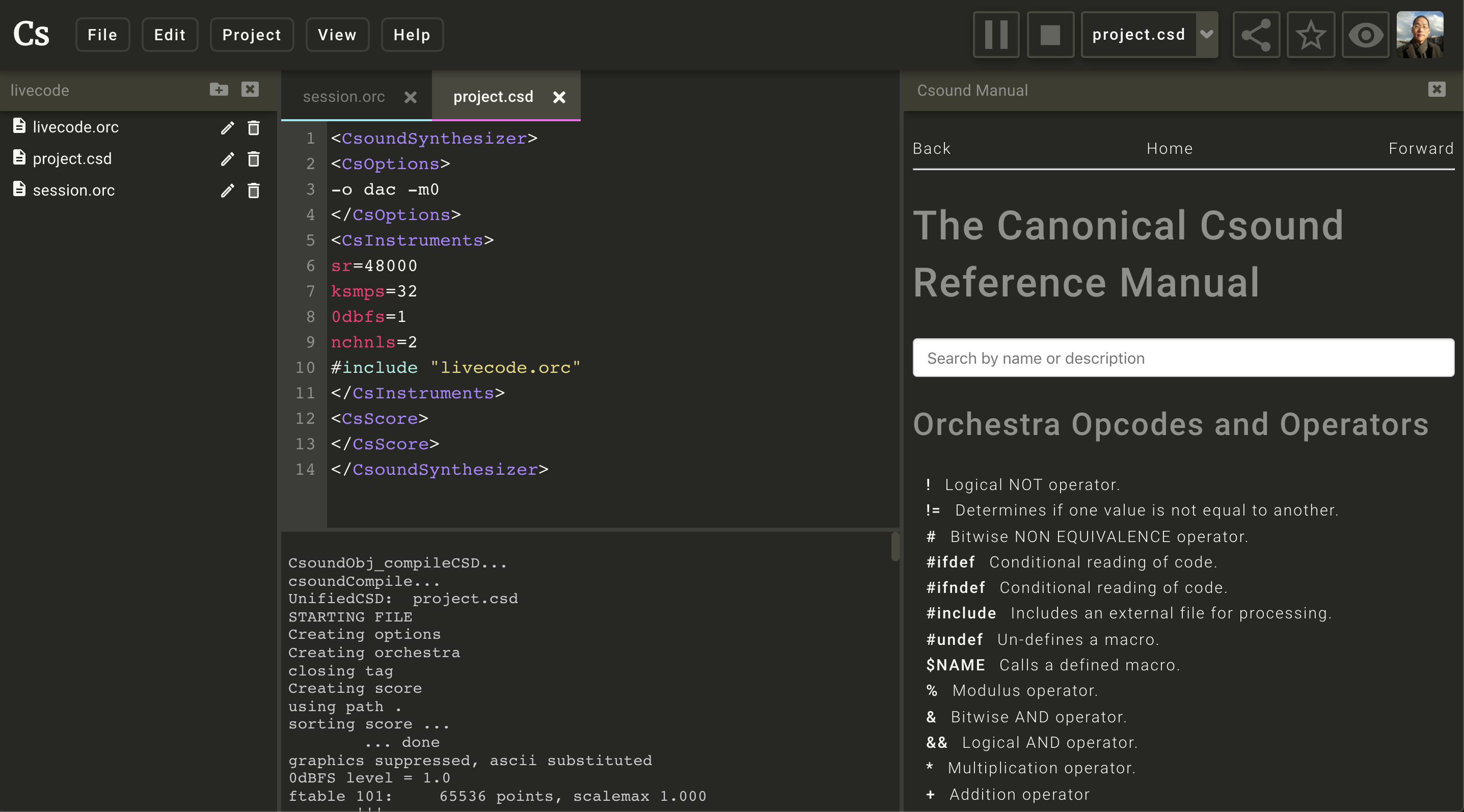
A browser-based IDE for the Csound audio programming language — write, run, and share Csound projects entirely in the browser, or install it as a native desktop app via Electron.



- Overview
- Features
- Lisp editing and live evaluation
- Prerequisites
- Getting Started
- Available Scripts
- Environment Variables
- Project Structure
- Architecture Overview
- Deployment
- Contributing
- License
- Acknowledgements
Csound is a sound and music computing system with a long history in computer music. Csound Web IDE brings Csound into the browser: projects are stored in the cloud, the audio engine runs via WebAssembly, and collaboration happens through shareable project URLs — no local installation required. The architecture in one line: WebAssembly Csound engine + React frontend + Firebase backend.
- Real-time Csound audio synthesis executed in-browser via a WebAssembly engine
- Syntax-highlighted code editor (CodeMirror 6 with a dedicated Csound language plugin)
- Multi-file project tree — CSD, ORC, SCO, UDO, and binary audio assets in one place
- Write and preview Markdown notes alongside your Csound files
- Edit Lisp files with Clojure highlighting, rainbow parentheses, and live evaluation
- Cloud persistence — projects saved to Firestore and audio files to Firebase Storage
- User profiles with followers, project discovery, and public/private project visibility
- Shareable editor URLs with injected Open Graph metadata for social previews
- Embeddable player for public projects, with playback and audio downloads
- Built-in Csound manual viewer accessible directly from the IDE
- Optional Electron desktop app for offline use without a browser
Files ending in .clj* or .mal use CodeMirror's Clojure mode with rainbow
parentheses. Brackets in strings and comments do not affect the colors.
Start a CSD or ORC target that loads your Lisp runtime include. That include
must define LispEval(source:S):i: return 0 for success and a nonzero value
for failure.
The runtime receives the exact selected text and owns its environment, reader, and evaluator. It must accept multiple forms for file or region evaluation. Use the existing Csound console to show results and errors.
While the project plays, use the Edit menu or these keys (Cmd on macOS, Ctrl elsewhere):
| Action | Shortcut | Lisp behavior |
|---|---|---|
| Eval Selection / Form | Cmd/Ctrl+E | Evaluate the selection, or the form at the cursor. |
| Eval Block | Cmd/Ctrl+Enter | Evaluate the enclosing top-level form. |
| Eval File | Cmd/Ctrl+Shift+Enter | Evaluate the whole file. |
Eval File also supports .orc, .udo, and .sco files. In a .csd file,
use Eval Block to evaluate an instrument or score statement.
The evaluated region flashes on success or turns red on failure, including a
missing LispEval opcode. WebMCP's csound_evaluate_region uses the same path.
The IDE passes source through a string channel, so quotes, newlines, Unicode,
and Csound macro characters stay intact. It queues evaluations in each engine
to preserve their order. The project's include supplies the Lisp runtime.
| Tool | Required | Notes |
|---|---|---|
| Node.js | 24.x | Local builds and CI use the version in .nvmrc |
| npm | >= 11 | Bundled with Node 24 |
| Firebase CLI | Optional | Required for local Functions emulation and deployment |
| Electron | Optional | Required for desktop builds only |
Install the Firebase CLI globally when needed:
npm install -g firebase-tools
firebase login
NixOS users: a development shell with Electron patched for NixOS is provided in shell.nix.
-
Clone the repository
git clone https://github.com/csound/web-ide.git cd web-ide -
Install dependencies
npm install
-
Configure environment variables
Create a
.envfile in the project root (see Environment Variables for all keys). A minimal example:REACT_APP_DATABASE=DEV VITE_FIREBASE_API_KEY=your-api-key VITE_FIREBASE_AUTH_DOMAIN=your-project.firebaseapp.com VITE_FIREBASE_DATABASE_URL=https://your-project.firebaseio.com VITE_FIREBASE_PROJECT_ID=your-project-id VITE_FIREBASE_STORAGE_BUCKET=your-project.appspot.com VITE_FIREBASE_MESSAGING_SENDER_ID=000000000000 VITE_FIREBASE_APP_ID=1:000000000000:web:abc123
-
Start the development server
npm run start
The app opens automatically at
http://localhost:3000.
| Script | What it does | When to use it |
|---|---|---|
npm run start |
Vite dev server targeting DEV Firebase | Day-to-day local development |
npm run start:prod |
Vite dev server targeting PROD Firebase | Testing against production data |
npm run build |
Type-check + production Vite build (PROD) | Creating a release artifact |
npm run build:dev |
Type-check + Vite build (DEV) | Staging / preview deploys |
npm run test |
Vitest in watch mode | TDD / local test iteration |
npm run test:ci |
Vitest single run (no watch) | CI pipelines |
npm run lint |
ESLint with zero-warnings policy | Pre-commit / CI quality gate |
npm run lint:fix |
ESLint with auto-fix | Cleaning up lint issues quickly |
npm run format |
Prettier write across src/ |
Auto-formatting source files |
npm run format:check |
Prettier check (no write) | CI formatting gate |
npm run typecheck |
tsc --noEmit strict type check |
Validating types without building |
npm run electron:dev |
Launches Electron against the local dev server | Desktop app development |
npm run deploy |
Firebase deploy to default (production) project | Production release |
npm run deploy:dev |
Firebase deploy to develop project | Staging release |
| Variable | Required | Description | Example |
|---|---|---|---|
REACT_APP_DATABASE |
Yes | Selects Firebase project config (DEV or PROD) |
DEV |
FIREBASE_TOKEN |
CI only | Pre-authenticated Firebase token for headless deploys | — |
VITE_FIREBASE_API_KEY |
Yes | Firebase web API key | AIzaSy... |
VITE_FIREBASE_AUTH_DOMAIN |
Yes | Firebase Auth domain | project.firebaseapp.com |
VITE_FIREBASE_DATABASE_URL |
Yes | Realtime Database URL | https://project.firebaseio.com |
VITE_FIREBASE_PROJECT_ID |
Yes | Firebase project identifier | csound-ide |
VITE_FIREBASE_STORAGE_BUCKET |
Yes | Cloud Storage bucket | project.appspot.com |
VITE_FIREBASE_MESSAGING_SENDER_ID |
Yes | FCM sender ID | 123456789 |
VITE_FIREBASE_APP_ID |
Yes | Firebase App ID | 1:123:web:abc |
The Firebase credentials for the DEV project are embedded in source for local development convenience (public/read-only project). For production, supply real credentials via environment variables and CI secrets.
Cloud Functions use a separate functions/.env file; see functions/.env.example for the
required STORAGE_BUCKET_URL key.
web-ide/
├── src/                  # React application source (TypeScript)
│   ├── components/       # Feature and UI components (editor, projects, profile, …)
│   ├── config/           # Firebase client initialisation
│   ├── db/               # Firestore collection references and types
│   ├── elements/         # Shared UI primitives (icons, MIDI piano, scrollbar)
│   ├── store/            # Redux store, slices, and root reducer
│   └── styles/           # Emotion themes and global styles
├── functions/            # Firebase Cloud Functions (TypeScript, Node 22)
│   └── src/              # Function handlers (auth, search, counters, SSR host)
├── public/               # Static assets and Electron entry point
├── config/               # Legacy webpack/build helpers (unused in Vite flow)
├── docs/                 # Developer notes and architecture documentation
├── scripts/              # Utility build scripts
├── search/               # Experimental standalone search service (inactive)
├── .github/workflows/    # CI/CD pipelines (lint, test, deploy)
├── firebase.json         # Firebase Hosting and Functions configuration
├── vite.config.ts        # Vite build configuration
└── tsconfig.json         # TypeScript compiler settings
The frontend is a single-page application built with Vite and React 18. Redux Toolkit manages all
shared application state — auth session, open projects, editor documents, and playback status.
The code editor uses CodeMirror 6 with @hlolli/codemirror-lang-csound for Csound-specific
syntax highlighting and opcode completion. Audio execution is handled by @csound/browser, a
WebAssembly build of the Csound engine; it can optionally run inside a Web Worker when
SharedArrayBuffer is available (the /editor/** route sets the required COEP / COOP
security headers). Firebase provides authentication, Firestore stores project metadata and file
references, and Cloud Storage holds binary audio assets. A dedicated Firebase Cloud Function
(host) serves the SPA and injects Open Graph metadata into HTML responses for social media
crawlers. An Electron wrapper (public/electron.js) reuses the same Vite build to deliver an
offline-capable desktop app.
GitHub Actions handles website deployment.
Start a local development session with Electron:
npm run electron:devThis command launches the Vite dev server and opens an Electron window once the server is
ready on port 3000. For packaging a distributable, use electron-builder (already listed as
a dev dependency); refer to its documentation for platform-specific build targets.
Contributions are welcome. The default branch is develop — all pull requests should target
develop, not master.
- Fork the repository and create a branch from
develop. - Make focused, well-scoped changes.
- Commit your work. A Husky pre-commit hook automatically runs
lint,typecheck, andformat:check— fix any failures before pushing. - Open a pull request against
developwith a clear description of the change.
-
npm run lintpasses with zero warnings -
npm run typecheckpasses -
npm run format:checkpasses -
npm run test:cipasses - New behaviour is covered by tests where applicable
Browse open issues and feature requests on the Issues tab.
Distributed under the GNU Lesser General Public License v2.1.
Csound Web IDE is built on the work of the global Csound community — composers, researchers, and developers who have maintained and extended Csound for over three decades.
Browser agents can read and edit Csound source, switch tabs, choose targets, play, stop, render, and read the console through 16 WebMCP tools. Click WebMCP ready in an open project for setup and the tool guide, or read WebMCP usage.
Make the project public, then open Share Project and copy HTML embed code. Paste it into a page that allows iframes:
<iframe
    src="https://ide.csound.com/embed/PROJECT_ID"
    title="Csound project"
    width="100%"
    height="360"
    style="border: 0;"
    loading="lazy"
    allow="autoplay"
></iframe>
The /embed/:projectId player loads the latest saved files without requiring a
login. It starts with the saved default target (the first file for a playlist),
or falls back to project.csd, default.csd, another CSD, then an ORC. Listeners
can choose a file, play, pause, stop, or render audio and download it. Projects
with file output in CsOptions offer Render audio and an audio player for the
result. Nothing plays until the listener clicks a control.
Private, missing, and empty projects show a message in the player. Links to the
IDE open in a new tab. The embed route needs no cross-origin isolation headers
or SharedArrayBuffer. Serve the parent page over HTTPS. For projects that use
live input, add microphone to the iframe's allow attribute; the listener must
still grant microphone access. A parent site's Permissions Policy can further
restrict these features.
To test playback and a WAV download in a cross-origin iframe against the local DEV server:
cd puppeteer-tests
RUN_EMBED=1 TARGET=local node --test tests/embed.js
Set EMBED_BASE_URL when the server runs on a port other than 3000.